ELEV8 DOMIN8
The big gold dial. One number for ELEV8's measured mastering dynamics, tone and glue: 0 is off, 100 is the full treatment. Most masters live between 30 and 70.
Opens the stereo sides. 0 keeps the image as recorded; turn up for air in the sides without touching the centre.
Three gentle tone moves in dB: low shelf around 178 Hz, mid bell around 636 Hz, high shelf around 10 kHz. Centre is flat, double-click resets.
Level into the clipper in dB. Push it to drive more peaks into the curve, pull it back if the gold area in the wave gets too big.
The big white dial, in dBFS: where the soft clipper starts to bend. Lower catches more peaks. The white line in the wave is the same control, drag it with the mouse.
Level after the clipper in dB. 0 is unity; cut here to leave headroom for a limiter after DOMIN8.
In the footer. Runs the clipper curve at 2, 4 or 8 times the sample rate so hot material aliases less; 1x is the original sound. Click OS to step through. Latency stays the same at every setting, so switching never moves your timing.
In the footer. Optional true-peak limiter at the output, off by default: click the word to switch it on (it lights up) and drag the value in dBTP (double-click for -0.10). It only acts on peaks above the ceiling, with 1 ms lookahead and a short release, for deliveries that demand a true-peak guarantee. Latency is the same whether it is on or off.
Peaks of the signal right before the clipper, flowing with the signal from left to right (with DOMIN8 on the right, the threshold line and the clipped part already show faintly under ELEV8): push INPUT to drive more into view. Everything above the threshold line shows in gold: that is what gets clipped. On the ELEV8 side the wave fills up with fine grain as CHARACTER adds harmonics. 1x / 1/2x sets the speed, the snowflake freezes the picture. Here the scale zooms to each example; the plugin draws a fixed -30 to +2 dBFS.
The big title at the top is the order switch: click it to swap. ELEV8 then DOMIN8 shapes first and clips last; the other way clips first and lets ELEV8 glue the result. The sections swap sides with it, so the flow always reads left to right. IN and OUT meters always show the plugin input and output; DOMIN8's INPUT and OUTPUT dials are the clipper's own drive and trim.
IN and OUT show peaks in dBFS for left and right on a 36 dB scale (all values below 0). The number holds the highest peak for 1.5 seconds. On OUT, click the number to switch between TP (true peak after 4x oversampling, held 3 seconds; keep it under 0 for streaming) and PEAK (sample peak). The red lights above the bars latch when a channel reaches 0 dBFS, in TP mode also at 0 dBTP: click the bars to reset them.
Integrated loudness at the output. It starts over when playback starts or the playhead jumps, or when you click the number.
The pill above each big dial switches that section; ALL ON / ALL OFF at the top right switches the whole plugin, level-matched and click-free, to compare before and after.
The particles around the big dials breathe slowly and flare up briefly on kicks and snares at the input. Pure display, nothing in the sound.
Without a licence the plugin runs in demo mode: a short gap in the sound every 20 seconds. Click the DEMO field and pick the .licence file from your order. One licence works on two computers; LOG OUT frees a slot.


 macOS and Windows · VST3, AU, AAX
ELEV8 and DOMIN8 in one window.
The title at the top is also the switch for the order: ELEV8 → DOMIN8 (shape, then clip) or DOMIN8 → ELEV8 (clip, then glue). The sections swap sides with it and the wave changes colour. It flows with the signal from left to right; with DOMIN8 on the right, the threshold line already runs faintly through the ELEV8 half, so you see early what is about to be clipped.
Order with one click
The title is the switch: ELEV8 → DOMIN8 shapes first and clips after, DOMIN8 → ELEV8 clips first and glues after. The sections swap sides, the meters change colour with them.
Each section its own ON/OFF
ELEV8 and DOMIN8 switch on and off on their own, ALL ON switches everything. You hear each part by itself without changing plugins.
One wave through both
The wave runs through both sections, gold into white. The threshold line sits on the DOMIN8 side, and below it you read the level between the two stages.
Measure, don't guess.
ELEV8, DOMIN8 and the suite share the readouts you actually work with when mastering.
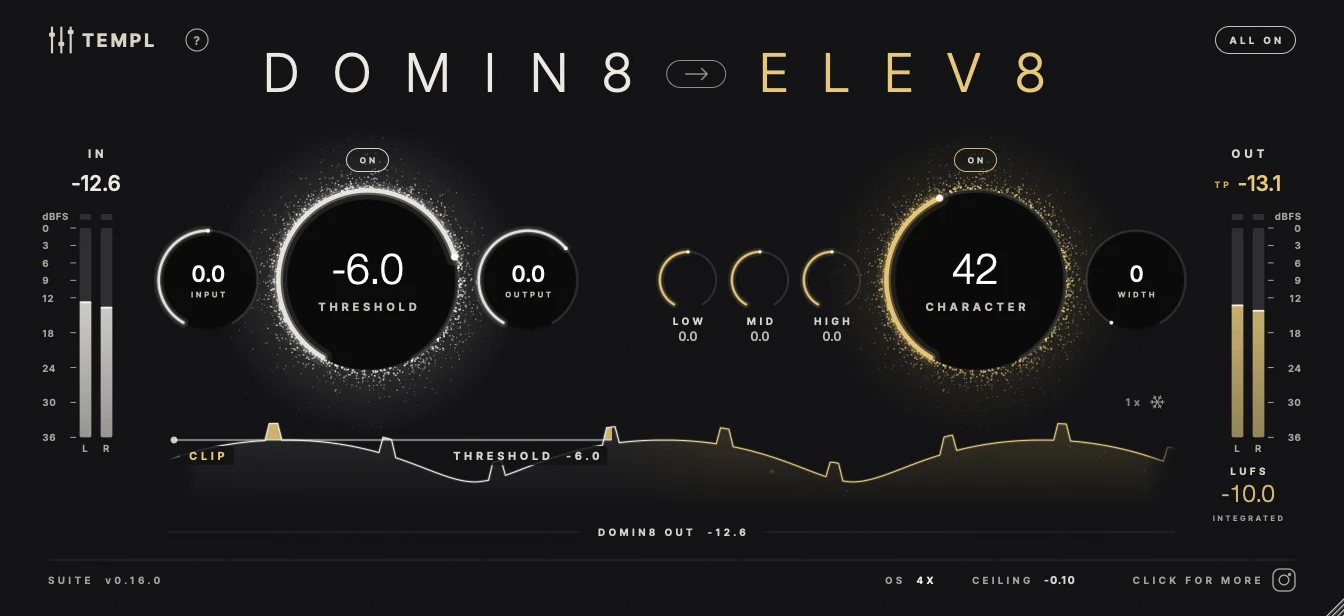
The suite with DOMIN8 first: clip, then glue. Rendered from the real plugin.
Listen first, then load one file. No account.
You can install the plugin without buying. It runs as a demo until a licence file is loaded.
Demo
Without a licence the plugin runs with every feature, only the sound drops out for 1.5 seconds every 20 seconds. The window reads DEMO · CLICK TO LOAD LICENCE.
One file, done
After the purchase you get a .licence file. A click on the demo field opens the file dialog, pick the file, done. No account, no typing codes.
Two devices
One licence is valid on two devices. LOG OUT in the plugin frees a slot again. The suite licence also unlocks ELEV8 and DOMIN8 on their own. Offline, everything keeps running for three days.
Runs where you master.
In short.
Get die Suite.
Both plugins in one window, plus ELEV8 and DOMIN8 on their own. macOS and Windows. VST3, AU, AAX.
Get it now